


TinyNest - Family Album
4.719.00 Reviews
App Specs
- Version
- 1.266.0
- Updated On
- License
- Free
- Downloads
- 10,000+
- Developer
- Tiny Nest AI LLC
- Categories
- Parenting
- Platform
- Android
Screenshots
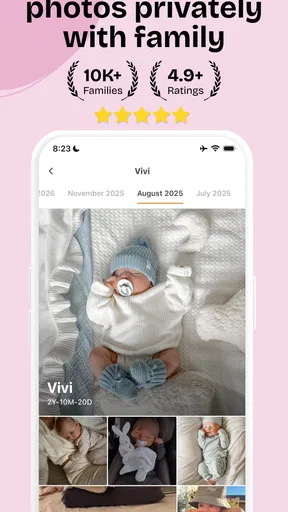
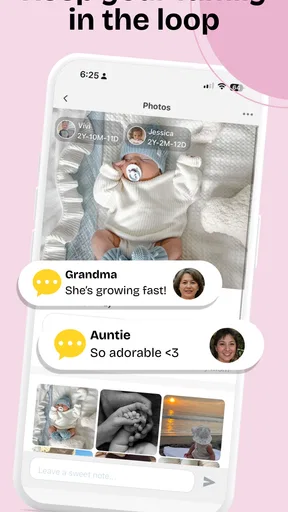
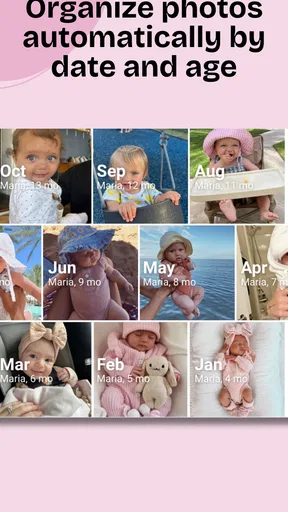
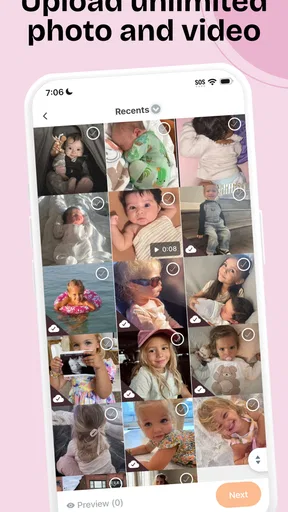
 Analysis by AppCompare
Sharing baby photos sounds simple until every relative wants a different way to receive them. One person prefers a family chat, another checks email, and someone else keeps asking for the latest picture because it disappeared in a busy conversation. TinyNest - Family Album takes a more focused approach: it is a parenting app built around keeping family photos together rather than mixing them with everyday messages.
I found the idea appealing because it addresses a very specific problem: making a child’s growing collection of photos easier for trusted family members to follow. The app is free to install, and its store presence shows a 4.7 average from around 460 ratings, with more than 10,000 installs. That gives it a reasonable early track record, although it is still a smaller service than the familiar chat and cloud-storage options many families already use.
My experience with it is best understood as a review of the whole routine around a family album, not just the act of uploading a picture. The important questions are whether setup feels manageable, what happens when a family member gets stuck, and whether a dedicated album is genuinely more useful than a shared conversation. Tiny Nest AI LLC has made a narrowly focused app, and that focus is both its strongest quality and its main limitation.
Where the first-time experience can become confusing
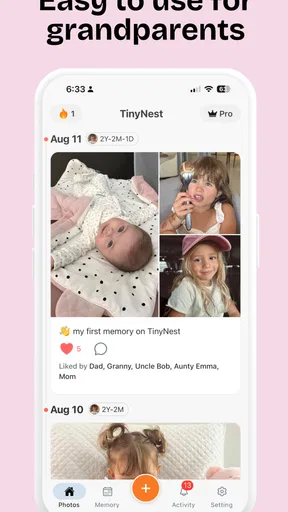
The most likely friction is not taking a photo. Parents already know how to do that. The harder part is creating a shared habit among people with different levels of comfort using apps. A parent may understand the album immediately, while a grandparent may hesitate at an invitation, an unfamiliar screen, or a request to complete a step they do not recognize.
That is why I would avoid treating TinyNest as a private replacement for every family conversation. Its value comes from giving baby photos a dedicated home. If you introduce it as “the place for the child’s pictures,” the purpose is clear. If you expect it to replace announcements, questions, scheduling, and general family chat, the experience becomes less focused and the app has to carry responsibilities it was not designed to solve.
Another point worth understanding is the difference between an app being free and the entire experience having no paid layer. TinyNest is listed as free, while optional in-app purchases range from $12.99 to $79.99 per item. I would therefore begin with the no-cost experience and only consider a purchase after deciding that the album fits your family’s routine. That approach prevents an important but simple question—“Will relatives actually use this?”—from becoming an expensive guess.
The Teen content rating may also surprise parents who expect every baby-photo tool to be labelled for young children. In practice, the intended users are adults sharing family images, not children playing with the app. I would treat the rating as a reminder to use normal care when deciding who receives access and what gets posted, rather than as a sign that the app is aimed at teenagers.
Worth Reading Before You Choose

EA SPORTS FC Mobile 26 Is a Bigger Football Game, but It Takes Time

Flipboard Shows What News Apps Must Do Beyond the Feed

Switching to Android Auto Means Rethinking Your Driving Routine

Google Calendar Makes a Crowded Week Easier to Manage

Ludo King Makes the Most of the Minutes Between Plans

Baby Panda World Brings Quick Play to Modern Phones, but Its Game Library Feels Busy
A calmer way to introduce it to relatives
My practical recommendation is to start with a small circle instead of inviting the entire extended family at once. Add the people who are most likely to look at new photos, explain the purpose in one sentence, and post a few meaningful images rather than flooding the album on the first day. This creates a clear test: do relatives understand where to look and return without repeated reminders?
A useful habit is to keep urgent information outside the album. If a family member needs to know about a doctor’s appointment or a change of plans, use the communication method everyone already checks. Use TinyNest for the visual record. Separating those jobs makes the album easier to browse and reduces the chance that an important message gets buried among pictures.
Setup checks that prevent avoidable problems
Before uploading a large batch, I would check the basics on every participating device. TinyNest supports Android from version 7.0 onward, so an older phone may be the first thing to verify. A device that cannot meet the minimum operating-system requirement is not experiencing an app bug; it is simply outside the supported starting point.
I would also make sure the app is updated to its current version, 1.266.0, before troubleshooting anything complicated. When several relatives use different phones, inconsistent app versions can make the same action look different or behave unexpectedly. Updating first is a simple way to remove one variable before asking someone to repeat an invitation or upload.
For the initial setup, I suggest using one recent photo as a test rather than selecting the entire camera roll. Confirm that the intended family members can reach the album and understand where the new image appears. This small test is more useful than discovering after a long upload that an invitation went to the wrong person or that a relative is looking in the wrong place.
Parents should also decide on a naming and posting rhythm before the album becomes crowded. A short caption such as “first visit to the park” or “Sunday nap” adds context that a date alone may not provide. The benefit is not just sentimental. Months later, a caption helps relatives understand why a particular picture mattered, while a stream of nearly identical images becomes harder to revisit.
What to check when an invitation does not work
When a relative says they cannot join, I would first confirm that the invitation was sent to the contact method they actually use. It is easy to invite someone through one account while they are checking another. I would then ask them to open the invitation from the same device where TinyNest is installed, rather than switching between a computer, a tablet, and a phone during the first attempt.
If the app opens but the expected album is not visible, I would avoid sending several new invitations immediately. That can create confusion about which one is current. Instead, close and reopen the app, check that the person is using the intended account, and repeat the process only after confirming the original invitation is no longer the active path. These are ordinary recovery steps, but they are especially important with relatives who may interpret repeated prompts as evidence that they did something wrong.
For a parent setting up the album, a stable internet connection is another sensible check before uploading. If a picture appears stuck, wait before tapping repeatedly. Multiple attempts can make it unclear whether the problem is slow connectivity, a delayed upload, or duplicate actions. A single test image gives you a clean way to judge what happened.
Recovering a family photo workflow after something goes wrong
The best recovery method depends on where the problem occurred. If the wrong photo was selected, stop the posting routine and review the album calmly before adding more. If a relative cannot find a new picture, ask them to describe exactly what they see instead of assuming the image failed to upload. That distinction matters: the photo may be present while the viewer is opening a different area or using a different account.
I would keep a simple household rule: one person manages the main posting routine, while relatives are encouraged to react or browse without independently creating multiple parallel albums. This is not a technical requirement; it is a way to reduce duplicate spaces and conflicting expectations. A family album becomes much easier to maintain when everyone agrees which place is the source of truth.
There is also a useful difference between a missing photo and an unwanted photo. If the issue is selection, fix the selection. If the issue is that a particular image should not be shared, treat that as a privacy decision and remove it from the routine rather than continuing to troubleshoot the upload. Parents often take dozens of nearly identical pictures, so a quick review before posting is worthwhile.
For a busy household, I would create a repeatable sequence: choose a small group of pictures, add brief context, check the audience, and then post. Doing these steps in the same order reduces accidental sharing and makes it easier to identify where a problem happened. It also keeps the album from turning into an unfiltered backup of every image on the phone.
When a paid option deserves consideration
The optional purchases are the part I would approach most deliberately. A family should not pay simply because the album has become emotionally important. First decide whether the free experience solves the original problem: can the right people see the pictures, do they return to the album, and is browsing more pleasant than searching through messages?
If the answer is yes, a paid option may be easier to evaluate because you already understand the routine. If the answer is no, spending more is unlikely to fix a basic participation problem. A relative who does not open a dedicated album will probably not become an active user merely because the household has selected a higher-priced option. The purchase decision should follow regular use, not precede it.
When the app is not the cause of the frustration
Some problems blamed on TinyNest are really family-process problems. If relatives forget to check the album, the issue may be that nobody agreed how often new pictures would be posted. If parents feel overwhelmed, the cause may be posting too many images rather than a weakness in the app. If conversations become scattered, the family may be asking a photo album to function as a messaging service.
This is where the app compares interestingly with ordinary alternatives. A family chat is faster for immediate discussion and usually requires no new destination, but photos can disappear beneath unrelated messages. General cloud storage is better for broad file management and large personal archives, yet it can feel impersonal for relatives who only want to see new baby pictures. Social networks may offer familiar sharing, but some families are uncomfortable mixing private family moments with a wider audience.
TinyNest sits between those choices. It is more focused than a chat and more family-oriented than a general storage folder, but it asks people to adopt one more app. That trade-off is worthwhile when the central goal is a simple, recurring photo space. It is less convincing when your family already has a shared album that everyone uses consistently and nobody finds difficult to browse.
I would also skip it if your priority is advanced photo organization rather than family viewing. A dedicated baby album is not automatically the best tool for editing, sorting a large personal archive, or managing every kind of family document. In those situations, the usual gallery or cloud-storage solution may be more practical. TinyNest makes the most sense when the social act of sharing is more important than technical archive management.
Privacy habits I would use from the beginning
Baby photos deserve a little more thought than ordinary snapshots. I would avoid posting images that reveal unnecessary personal details, such as visible addresses, documents, or location clues. I would also review the intended audience before sharing a picture taken in a private setting. A dedicated album can make sharing feel safer, but convenience should not replace judgment.
Another good habit is to revisit the family list occasionally. Relatives’ phones, accounts, and circumstances change. A quick review of who still needs access is easier than trying to reconstruct the audience after months of posting. This is especially useful when several adults contribute photos and assume that someone else is checking the audience.
Finally, keep irreplaceable originals elsewhere if they matter to you. I would not rely on one app as the only home for a child’s complete photo history. TinyNest can be the place relatives visit, while your normal device or storage routine remains the place where you keep the originals. That separation protects the family record and lets the app focus on sharing.
My practical verdict for parents and relatives
After looking at the full workflow, I see TinyNest - Family Album as a focused solution for families who want baby photos separated from noisy conversations. The developer, Tiny Nest AI LLC, has chosen a clear audience and a clear use case. Its free entry point makes it easy to test, while the 4.7 average and more than 10,000 installs suggest that the concept is already attracting real interest.
I would recommend it to parents who regularly send the same photos to several relatives, especially when those pictures get lost in group chats. I would also recommend trying it for grandparents or other family members who want a simple visual connection but do not need access to every conversation in the household. The strongest result comes from using it as a calm, dedicated album rather than as an all-purpose family communication tool.
I would be more cautious for families that already have a shared gallery everyone checks, or for people who want detailed archive controls and broad file management. Adding a new service only helps when it removes work. If your current method is already reliable, TinyNest may not offer enough difference to justify changing habits or considering optional purchases.
My final advice is to test the routine, not just the installation. Set up the album, invite a small group, post a limited selection, and see whether relatives can return without constant coaching. The real measure of success is not how quickly the first photo appears, but whether the family keeps using the album naturally. If that happens, TinyNest earns its place as a practical parenting companion; if it does not, a familiar shared album or family chat may remain the better fit.
Pros
- Private space for sharing family photos and memories
- Clean
- simple interface that is easy for all ages
- Keeps family moments organized in one dedicated album
- Useful for relatives who avoid public social networks
- Encourages regular sharing between distant family members
Cons
- Some features may require a subscription or in-app purchases
- Storage limits could become restrictive for large photo collections
- Requires family members to install and learn the app
- Limited appeal if your relatives prefer existing messaging apps
- Privacy depends on account security and the service’s policies
FAQs for TinyNest - Family Album
What is TinyNest - Family Album used for?
TinyNest - Family Album is designed to help families collect, organize, and share personal photos and memories in one private space. Instead of relying only on social media, you can use it as a dedicated family album for milestones, everyday moments, children’s photos, and special events. Its main appeal is keeping family memories together and making them easier for selected relatives to view.
Is TinyNest - Family Album private and safe for sharing family photos?
Privacy is one of the most important points to consider before uploading personal or children’s photos. TinyNest is intended for private family sharing rather than public posting, but users should still review its permission settings, account options, and privacy policy before creating an album. Avoid sharing access links publicly, use a strong password, and only invite people you trust to view or contribute.
Can several family members contribute to the same album?
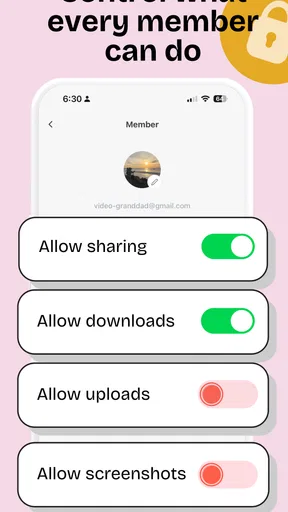
The app is built around family collaboration, so it is suitable for situations where more than one person wants to add memories to a shared album. Depending on the current version and account setup, invited members may be able to upload photos, view content, or interact with the album. Check the available roles and invitation controls in the app before sharing access with relatives.
Does TinyNest - Family Album work without an internet connection?
TinyNest primarily depends on an internet connection for functions such as signing in, synchronizing albums, uploading photographs, and retrieving content stored online. Some previously loaded images may remain temporarily available on your device, but offline access should not be assumed for every feature. If you are traveling or have limited data, upload photos over Wi-Fi and confirm that synchronization has completed.
Is TinyNest - Family Album free to download and use?
The application may be available to download at no initial cost, but the exact features included in the free version can depend on the platform, region, or current developer policy. Some services may limit storage, album size, invitations, or advanced options unless you subscribe or make an in-app purchase. Review the store listing and pricing details before uploading a large family archive.


